Independent photo-to-video studio · IVE "Looks Can Kill" trend

Action Hero Video Generator: From One Photo to a Held Hero Pose

The "Looks Can Kill" dance trend runs on a single beat: you drop into a low stance, throw a finger-gun point, and hold it while the camera keeps rolling. Our action hero video generator turns that beat into a clip. Upload one clear photo and the studio builds a short vertical video with slow motion, a low camera angle, a wind pass and a final pose held to the last frame.

It is a fan-made effect, not an official release. We are independent of IVE and Starship Entertainment, we do not use the official recording, music video or member likenesses, and clips render silent unless you add your own audio. Pricing is credit-based: credits start at $9.90, a standard 720p 12-second clip costs 35 credits, and renders that fail are refunded to your balance.

Clips on this page are AI-generated previews. They are fictional and not a record of a real event.

Updated 20 October 2026

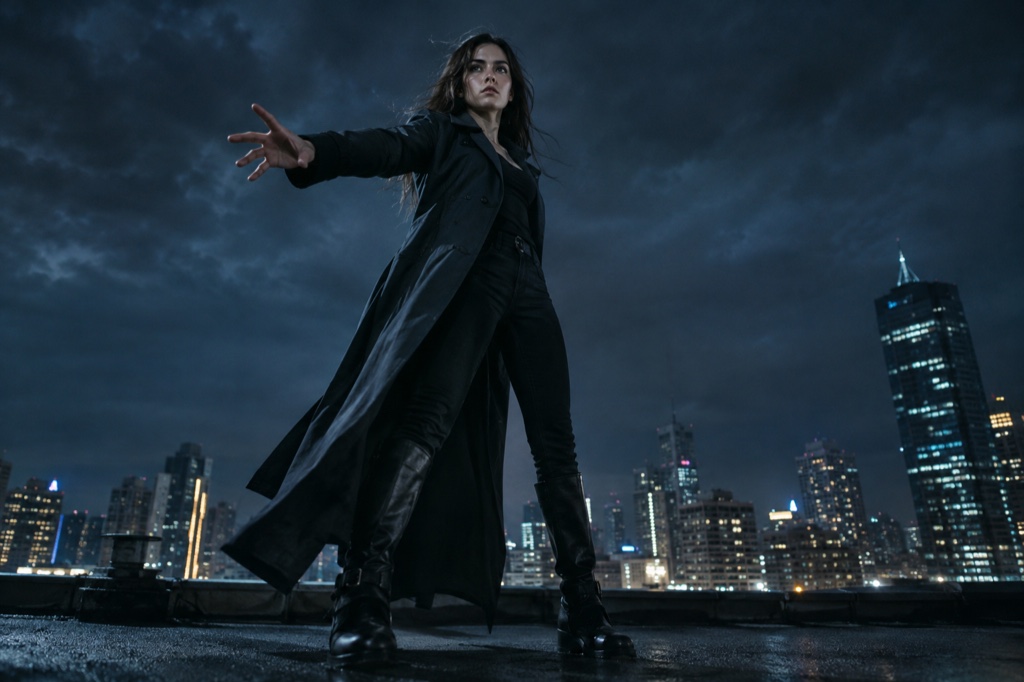
Vertical 9:16 frame from the tool: a person in a low stance pointing a finger-gun toward the camera, jacket lifted by wind, shot from below in slow motion.
Length
5–12 seconds
Resolution
480p · 720p · 1080p
Aspect ratio
9:16 · 16:9 · 1:1
Watermark
None on paid renders
Model
Seedance 2.0
Moderation
SeeAPI, fail-closed

One photo, one shot

No timeline, no keyframes. Upload a single clear photo and describe the beats you want; the studio builds the vertical clip around your face, your stance and your pointing arm.

Camera work built for hero shots

An angle looking up from below, slow motion on the arm, a wind pass across hair and fabric, and a final point held until the clip ends. That combination is what reads as action-hero rather than portrait.

Honest credits

Credits start at $9.90. A standard 720p 12-second clip is 35 credits, and failed renders go back to your balance instead of disappearing.

How it works

  1. 1

    Choose a photo that already reads

    Pick something sharp, evenly lit, with one person in it. Leave room around the head and the pointing hand — cropped fingers are the most common reason a hero point comes back looking wrong.

  2. 2

    Crop to 9:16 before you generate

    The output is vertical, so framing matters more than resolution. Sit the subject slightly low in the frame so there is space above for the camera to look up into and for the held pose to land.

  3. 3

    Write the beat sheet in the prompt

    Name the four things you want: low angle, slow motion, wind, and a finger-gun point held at the end. Short and specific beats a long description — "slow push-in, jacket blowing, arm locks into the point and holds" is enough.

  4. 4

    Render, check the last seconds, re-roll

    A standard render is 720p, 12 seconds, 35 credits. Watch the final two seconds first, since that is the held pose; if the arm or face drifts, re-roll with a simpler prompt. Failed renders are refunded.

Start from a tested prompt

Each prompt is complete: subject, scene, camera and what must not change. Copy it or open the studio with it pre-filled.

Example output: one uploaded portrait on the left, and on the right the same person as a 12-second vertical clip, arm extended into a held hero point.

Rooftop hero

A rooftop hero scene that keeps the face and outfit from your photo.

Prompt (English)

Use the person in the uploaded photo as the only hero. Keep their face, hair, skin tone and outfit exactly as photographed. Night rooftop above a glowing city skyline, a light breeze moving their hair and jacket. The person walks two steps toward the lens, crosses their arms, snaps a finger-gun hand toward the camera, points at the lens, shifts their weight through a sharp side step, lifts one bent leg, raises an arm overhead and settles into a wide action-hero stance with one final point. One continuous vertical 9:16 shot at full-body distance, a slight low angle, cinematic teal and amber light, slow motion on the snap. No text, no watermark, no other people, no real celebrities, no logos.

Use in studio

Comic frame

A comic frame scene with a tighter camera and a held final pose.

Prompt (English)

Use the person in the uploaded photo as the only hero. Keep their face, hair, skin tone and outfit recognisable, then render the whole shot as an original comic-book hero sequence: bold ink outlines, flat cel shading, halftone texture and graphic speed lines. The person crosses their arms, fires a finger-gun point at the lens, snaps once, steps into a wide stance, raises an arm overhead and holds a hero pose. One continuous vertical 9:16 shot at full-body distance, dramatic low angle, limited palette of deep navy, warm yellow and off-white. Original character art only: no existing comic characters, no real celebrities, no text, no watermark, no logos.

Use in studio

Spotlight finale

A spotlight finale scene for a more graphic, stylised result.

Prompt (English)

Use the person in the uploaded photo as the only hero. Keep their face, hair, skin tone and outfit exactly as photographed. A dark stage with a single warm spotlight and a thin haze in the air. The person steps into the light, crosses their arms, snaps a finger-gun point at the lens, shifts through a side step, lifts a bent leg and finishes with an arm overhead and a held final pose as the light tightens on them. One continuous vertical 9:16 shot at full-body distance, slow push-in, deep shadows and warm rim light. No text, no watermark, no other people, no real celebrities, no logos.

Use in studio

Why the hero framing works: low angle, slow motion, wind, held pose

A hero shot is mostly camera grammar. Put the camera below eye level and your subject stops looking like a person standing in a room and starts looking like someone the room has to make space for. Slow the motion down and small movements — the elbow locking, the wrist turning — read as decisions instead of twitches.

Wind is the cheapest way to add scale. A jacket edge, a strand of hair, a sleeve lifting against the direction of the point all suggest air moving around the subject, which the eye reads as force. Without it, a held pose tends to look like someone standing still.

The held final pose is the part people remember. The clip should land on the point and stay there for the last beat, so a loop, a screenshot and a thumbnail all catch the same frame.

Where the "Looks Can Kill" trend comes from

IVE is a K-pop girl group under Starship Entertainment. "Looks Can Kill" is the title track of their fifth EP: the single arrived on 19 October 2026, with the EP following on 26 October 2026, built around a girl hero concept and finger-gun, point-based choreography.

The AI trend is fan-made, not an official campaign. People take one photo of themselves, generate a short vertical clip of the hero point, and post it next to everyone else doing the same beat. One photo in, one 12-second clip out — that is the whole format.

This site is independent and not affiliated with IVE or Starship Entertainment. We do not use the official recording, the official video or any member's likeness; the person in the clip is you, generated from your upload.

What a render costs and what you actually get

Credits start at $9.90. A standard clip — 720p, 12 seconds, vertical — costs 35 credits, and renders that fail are refunded to your balance, so an unusable generation does not eat your budget.

Output is silent by design. We do not ship the official audio or any licensed track, so you add your own sound when you post; clearing the real song is between you and the rights holders.

What you are paying for is the camera work: the low angle, the slow push, the wind pass and the held final pose, generated from one photo rather than staged on a set.

Questions people ask

Is Looks Can Kill AI an official IVE or Starship product?

No. This is an independent studio and it is not affiliated with IVE or Starship Entertainment. It does not use official footage, the official recording or any member's likeness — the clips are generated from photos that users upload of themselves.

Does my clip include the official "Looks Can Kill" recording?

No. Renders come out silent and no licensed music is included. Add your own audio in the app you post from, and clear any commercial track yourself before publishing.

What does a render cost?

Credits start at $9.90. A standard 720p 12-second vertical clip costs 35 credits, and any render that fails is refunded to your balance, so you are not charged for output you cannot use.

What kind of photo works best?

A sharp, evenly lit photo with one person in it, showing the whole head and the pointing arm. Avoid heavy filters, busy backgrounds and cropped hands — the model has to invent less when the pose is already visible.

Do I need to know the choreography?

No. You describe the beats in text — low angle, slow motion, wind, and a finger-gun point held at the end — and the studio builds the motion from your photo. Knowing the original routine helps your timing choices, but it is not required.

Is the studio only for this trend?

It is built around the "Looks Can Kill" hero point, but the same four beats — low angle, slow motion, wind, held pose — work for any clip where you want the subject to read as larger than life. Change the prompt and the framing follows.

Turn your photo into a clip

Start with the preset on this page, or write your own shot. Credits are shown before you generate, and failed renders are refunded.